 Nixly
NixlyPhoto cleaner for iPhone that counts honestly
Nixly scans your camera roll on the phone itself, keeps true duplicates apart from bursts so no count is padded, and tells you plainly that the gigabytes only come back once you empty Recently Deleted.

Free to download. No account, nothing uploaded.
Free to downloadiPhone, iOS 17 or later5.0 out of 5 from 3 ratings on the App StoreData Not Collected privacy label
-
Category 1
Exact duplicates
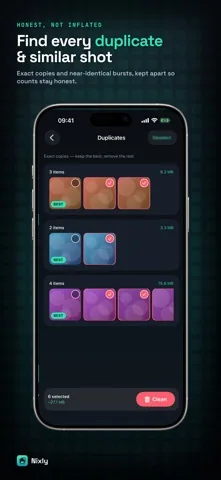
Real copies, matched on pixel dimensions together with a 64 bit fingerprint taken from the image itself.
-
Category 2
Similar shots
Bursts and near identical frames, compared only inside a 60 second window and kept in their own category.
-
Category 3
Screenshots
Everything iOS tagged as a screenshot, listed with its measured size instead of a guess.
-
Category 4
Large videos
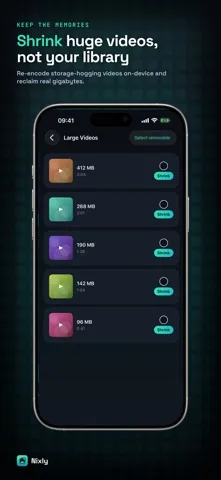
Videos of 50 MB or more, sorted biggest first, with a shrink option that keeps the memory.
Four screens, no dashboard theatre
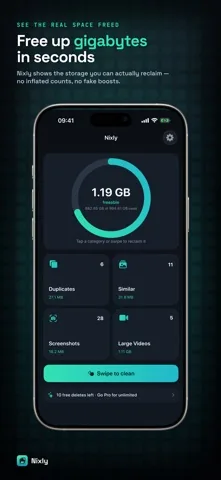
Four steps, and the fourth is the one other apps skip
-
Scan
Nixly reads your library locally, fingerprints the stills, groups the bursts and measures the file size of every item it is going to show you.
-
Review
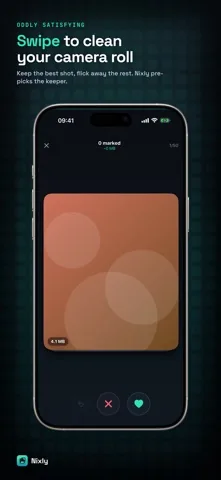
Each group opens with the best copy already excluded from the selection. You can change any of it, or flick through the whole set in the swipe view.
-
Confirm
One tap sends the whole batch to Apple's Photos framework, which asks for your confirmation. Marking something is never the same as removing it.
-
Empty Recently Deleted
iOS holds deleted photos for 30 days and they still take up space. Nixly says so on the result screen and gives you a button straight into the Photos app.
Cleaners that announce freed gigabytes at step three are describing something that has not happened yet. Your storage figure does not move until the Recently Deleted album is empty. Nixly would rather tell you that than take the credit.
Built so the numbers survive checking
Counts that are not padded
A photo belongs to one category and one only. Anything grouped as a duplicate is taken out of the pool before the similar and screenshot lists are built, so the same file never shows up in two totals. The headline figure is the sum of the four categories, and each category total is built from measured file sizes with the copy you keep left out of it.
Sizes that were measured, not estimated
For every item Nixly is going to offer you it requests the real resource: the image data for a photo, the file size on disk for a video. Nothing is derived from resolution or duration.
The best copy is chosen for you, and kept
In each group Nixly keeps the highest resolution shot. If two are equal it keeps the larger file, and if those match too it keeps the newest. That keeper is marked BEST and is left out of the selection and out of the swipe deck entirely.
Video shrinking that checks its own work
Nixly re-encodes the video to a 720p MP4 on the device, writes the smaller copy into your library, and only removes the original once that has succeeded. The saving it reports is the difference between the two real files. If the re-encode does not come out smaller, nothing is replaced.
Nothing leaves the phone
There is no account, no login and no server behind Nixly. The app contains no analytics or advertising code. Scanning uses Apple's Photos, Vision and AVFoundation frameworks on the device, and the App Store privacy label says Data Not Collected.
You can see everything before you pay
The whole scan is free, including every size figure and the total. You also get 10 free deletions. Nothing is blurred out to make you subscribe before you know whether there is anything worth cleaning.
What people wrote on the App Store
-
5 of 5
Really handy for clearing out duplicate photos, screenshots, and large videos. I like that it shows how much space you can actually free up and keeps everything on the device.
-
5 of 5
I had so many files and media and was too lazy to go through them one by one. This app helped me figure them out and identify which ones to delete, and now I have freed up some space.
-
5 of 5
App is super clean super smooth and overall vibe is great. Extremely easy to use and a great user experience. Finds duplicates very well and quickly and allows you to delete them with ease.
Nixly is a young app. Three ratings is a small number and we would rather say so than dress it up.
Free to scan, free to start cleaning
-
Nixly, free
$0The complete scan with every measured size, plus 10 deletions.
- All four categories, fully listed
- The total freeable figure
- Swipe review
- 10 free deletions
-
Nixly Pro, weekly
$4.99 / weekIncludes a 3 day free trial. Renews weekly until you cancel.
- Unlimited deletions
- Unlimited swipe cleaning
- On-device video shrinking
-
Nixly Pro, yearly
$29.99 / yearThe same Pro features. This plan has no free trial.
- Unlimited deletions
- Unlimited swipe cleaning
- On-device video shrinking
US App Store prices. Payment is charged to your Apple Account. A subscription renews automatically unless you cancel at least 24 hours before the period ends, and you can cancel any time in your App Store account settings.
How iPhone storage actually works
Written to be useful whether or not you install anything. Most of these jobs can be done for free in the Photos app, and where that is true these pages say so.
- How to free up storage on your iPhone
The full audit, starting with the steps that cost nothing and need no app at all.
- Storage still full after deleting photos
Why the gigabytes do not come back, and the one album that is holding them.
- Duplicate photo remover for iPhone
What separates a true duplicate from a burst, and why mixing them inflates every count.
- The iPhone Duplicates album versus an app
Apple already ships duplicate detection. Here is exactly where it stops.
- How to delete all screenshots on iPhone
The free route through the Photos app, and what a cleaner adds on top of it.
- Compress videos on your iPhone
What re-encoding really saves, and when shrinking a video is a bad trade.
- Swipe to delete photos on iPhone
A swipe marks a photo. It does not delete it. Why that distinction matters.
- Are iPhone photo cleaner apps safe?
Five checks to run before you hand any app your entire camera roll.
Frequently asked questions
How do I free up storage on my iPhone with Nixly?
Nixly scans your photo library on the phone itself and sorts what it finds into four groups: exact duplicates, similar shots from the same moment, screenshots, and videos of 50 MB or more. Every group shows the measured bytes you would get back. You review the suggestions, confirm the ones you want gone, and then empty Recently Deleted in the Photos app, which is the step that actually returns the space.
Is Nixly free, and what does Nixly Pro cost?
Nixly is free to download and the full scan is free. You can see every duplicate, similar shot, screenshot and large video with its size before paying anything, and you get 10 free deletions. Nixly Pro removes the limit and adds on-device video shrinking. It costs 4.99 US dollars per week with a 3 day free trial, or 29.99 US dollars per year, which has no trial. Both prices are the US App Store prices.
Does Nixly delete my photos on its own?
No. In the swipe view a left swipe only marks a photo, and the counter at the top shows how many are marked and how much that adds up to. You can step back with undo. Nothing is removed until you tap the delete button, and even then the removal runs through Apple's own Photos framework, which asks you to confirm before it touches anything.
When I delete photos in Nixly, is the storage freed right away?
No, and Nixly says so on the screen instead of hiding it. Deleted photos move to the Recently Deleted album, where iOS keeps them for 30 days so you can get them back. Until you empty that album the files still occupy your storage. Nixly shows this after every clean-up and offers a button that opens the Photos app so you can finish the job.
How does Nixly tell a real duplicate from a similar shot?
Two different tests. For duplicates Nixly computes a 64 bit difference hash from a tiny greyscale render of each photo and pairs it with the image's pixel dimensions, so only genuine copies land in one group. For similar shots it uses Apple's Vision framework to compare feature prints, and it only compares photos taken within 60 seconds of each other. The two categories never overlap, so a photo is counted once and never twice.
Can Nixly shrink large videos?
Yes, with Nixly Pro. Nixly re-encodes the video to a 720p MP4 on the device, saves the smaller copy into your library first, and only then removes the original. The figure it reports is the real size difference between the two files, measured after the export, not an estimate. If the re-encode does not come out smaller, Nixly leaves the original alone.
Are my photos private?
Nixly has no account, no login and no server of its own. There is no analytics or advertising code in the app, and its App Store privacy label states Data Not Collected. The scan uses Apple's Photos, Vision and AVFoundation frameworks locally, and your photos are never uploaded anywhere.
Does Nixly work on iPad?
Nixly is built for iPhone and needs iOS 17 or later. It is not designed for iPad, and there is no iPad layout.
See what your camera roll is really costing you
The scan is free and so is the total. If it turns out there is nothing worth cleaning, Nixly will tell you that too.

iPhone, iOS 17 or later. 5.0 out of 5 from 3 ratings.